
A one-button rhythm runner: tap on the beat to hop, glide, flip and dart through fourteen songs.
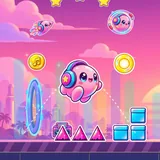
A little blob with big headphones runs to the music, and every spike, platform and portal sits right on the beat. Tap or hold to hop, and listen: the song plays an accent exactly where you should jump, so a level feels like playing along with the track.
Portals turn you into a glider that rises while you hold, a flipper that swaps gravity with every tap, and a dart that zig-zags at 45 degrees. Bounce on jump pads, tap yellow orbs in mid-air, flip upside down with blue orbs, and race through speed portals. Every song is short, every crash restarts instantly, and the attempt counter shows how far you have come.
Fourteen songs from a gentle warm-up to two encores that build from steady beats to offbeat jumps, speed changes and tighter flying corridors, each with three stars to earn: clear it, clear it without checkpoints, and grab all three coins. Practice mode drops checkpoints along the way so you can learn the tricky parts.
The hero runs by itself. Tap or hold to jump over spikes and onto platforms, ideally right on the beat. In glider form hold to rise and let go to sink, in flipper form tap to swap gravity, and in dart form hold to go up and let go to go down. Reach the end of the song to clear it.
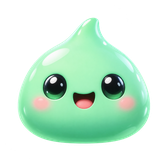 Blobwise